
How to Register and Create an Account on 3RR Game
If you are new to 3RR Game, the first step is creating your account. Registration is simple and takes just a few minutes. Once your account is set up, you can easily deposit money to start playing or withdraw your winnings anytime.
Follow this step-by-step guide to create your 3RR Game account after download APK from 3rrgame.net.pk:
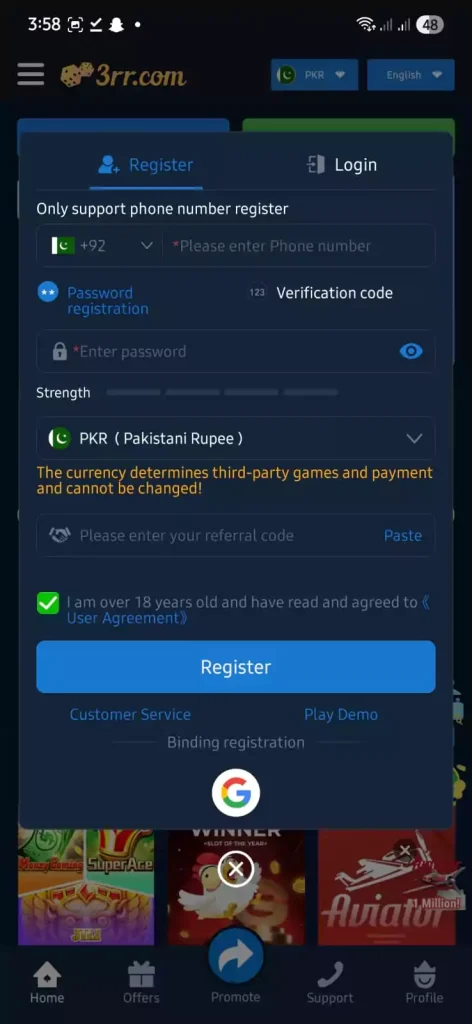
Step 1: Open the Registration Page
- Open the 3RR Game app or official website.
- Tap on Register at the top of the login screen.
- You will see the Phone Number Registration form.

Step 2: Enter Your Phone Number
- Select +92 (Pakistan) if not already selected.
- Enter your active mobile number.
- You will receive a verification code via SMS.
Step 3: Set Your Password
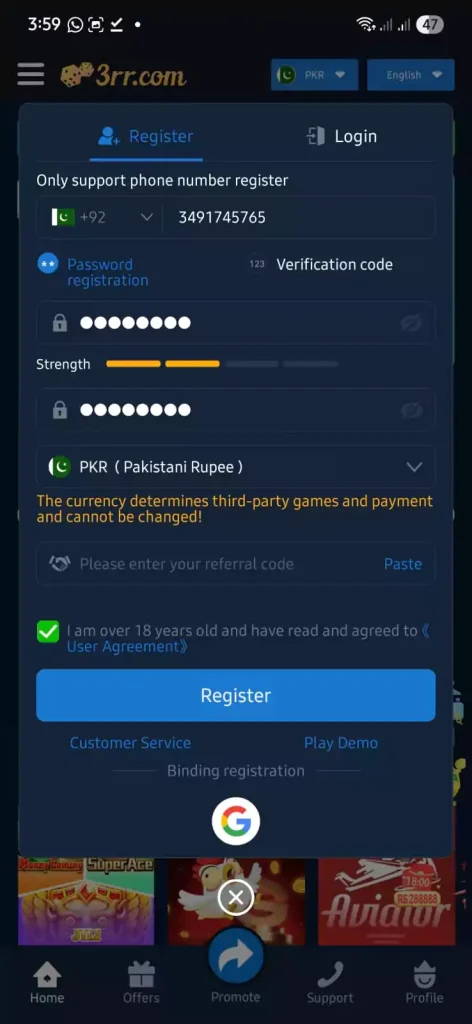
- Choose a strong password (use numbers and letters for safety).
- Confirm the password again in the second field.
- Make sure you remember it this will be used to log in every time.
Step 4: Confirm Currency
- By default, currency is set to PKR (Pakistani Rupee).
- This cannot be changed later, so leave it as PKR.
Step 5: Add Referral Code (Optional)
- If you have a referral/invite code, enter it here.
- This may give you bonus rewards.
Step 6: Accept Terms & Register
- Tick the box confirming you are 18+ and agree to the User Agreement.
- Tap the Register button.
- Congratulations! 🎉 Your account is now created.
tep 7: Log In & Explore
- Use your phone number and password to log in.
- Once inside, you can:
- Deposit money to start playing games.
- Withdraw your winnings securely when you win.
- Claim bonuses and rewards available to new users.
Now that your account is ready, the next step is to Deposit Money so you can enjoy games like Aviator, Teen Patti, Slots, and more.